






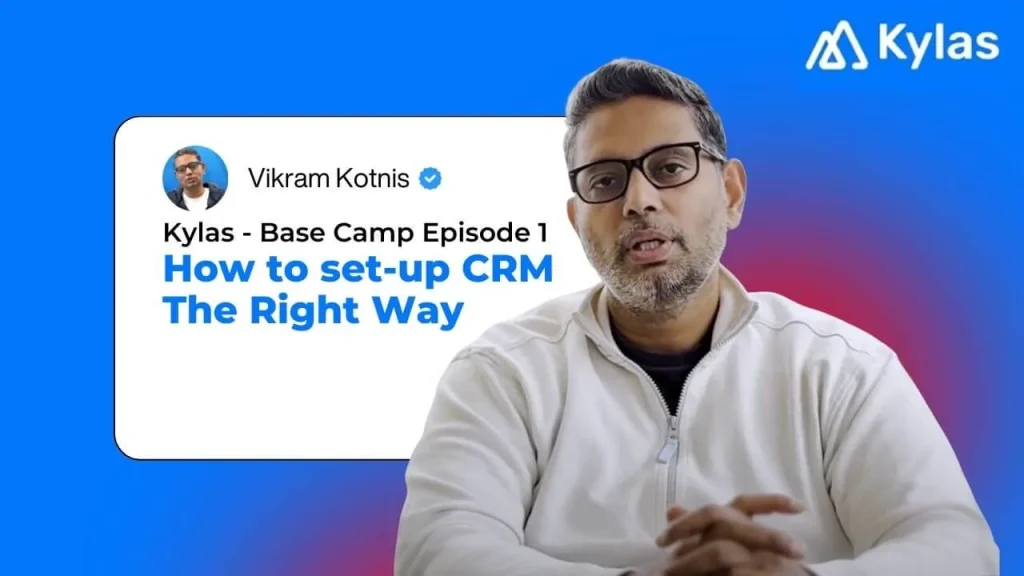
Base Camp Episode 1: How to Setup CRM for your Business | A Founder’s Playbook
Posted on September 3, 2025 by Mr. Vikram Kotnis, Founder & CEO of Kylas
I’m Vikram Kotnis, Founder & CEO at Kylas. After watching hundreds of teams set up CRMs, one pattern is painfully common: most businesses use 10–15% of what they’ve bought. Not because they don’t need the rest—but because the setup never matched their selling reality.
Think of your growth like a mountain. Base Camp is your CRM foundation—done right, the climb becomes faster and safer. Below is the step-by-step I recommend before you run any campaigns or hire more reps.
Step 0 — Decide What You’ll Measure (Before You Click Anything)
Configure the tool to answer your business questions:
- What reports do leaders need weekly? (pipeline value, velocity, win rate, drop-offs)
- Which stage-to-stage times matter? (lead → first response, demo → proposal, proposal → close)
- What will marketing optimize to? (cost per engagement, cost per qualified lead)
If you don’t design the reports first, you’ll design the wrong CRM. See Demo
Step 1 — Know Your Selling Model
Core entities you’ll use everywhere: Company/Account, Contact, Product, Lead, Deal.
- B2B (company-to-company): multi-stakeholder, multi-product. You need Lead and Deal pipelines.
- B2C (company-to-consumer): one-to-one. You can run without a Deal pipeline (or add one for high-value closures).
- B2B2C / Channel / Dealer: treat the institution as the Account; map many contacts; often multiple deals.
- E-commerce: treat CRM as your CDP + retention engine; usually one large lead/customer pipeline.
Step 2 — Design Your Pipelines (as Datasets, not Decorations)
A pipeline is a dataset you’ll run activities and reports on. Create the minimum set that mirrors your motion:
- Suspect / List-build pipeline (outbound research and first outreach)
- Lead / Prospect pipeline (interest detected; qualification happening)
- Deal pipeline (demo, proposal, negotiation, close)
- Customer/Nurture pipeline (upsell, renewals, references)
Name stages in plain language and define entry/exit criteria. Make one owner accountable for each stage. See Demo
Step 3 — Build Your Suspect List (ICP First, Tools Second)
Define your ICP by industry, size, geography, and buying role. Then compile accounts/contacts:
- Sources: LinkedIn, events, referrals; data providers like Apollo/ZoomInfo/EazyLeadz
- Import into CRM with clean Company + Contact mapping
- Tag records by source, segment, geography, and cohort for cohort-level reporting later
Step 4 — Wire Up Your Communication & Sequencing
Unify every channel so signals flow back into one timeline:
- Connect corporate email (Gmail/Outlook) for sending + tracking
- Enable WhatsApp and cloud telephony for conversations and call outcomes
- Keep a shared template library (email/WhatsApp/call talk tracks) by segment and stage
- If you run multi-step sequences, configure them now (and log every touch in CRM)
Step 5 — Define the Signals & Scoring (So the System Can Nudge You)
List the engagement signals you care about and assign weights:
- Email open / click, WhatsApp read / reply, call connected, meeting booked, demo done
- Page views (pricing/spec sheet), repeat visits, form submissions
- Set a score threshold that auto-moves a record from Suspect → Lead/Prospect, assigns an owner, and creates a first-response task
Automation principle: signals in, actions out (ownership, tasks, messages, stage move).
Step 6 — Hand-off to Sales with SLAs
When a record becomes a Lead/Prospect:
- Auto-assign to the right rep/team (territory, segment, product)
- Create a first-response SLA task (e.g., 15–60 minutes)
- Offer booking links for demos; attach the relevant deck/playbook
- Capture discovery notes in a structured note template (that you can convert to tasks)
Step 7 — Create Deals the Smart Way
When interest is real:
- Convert to Deal(s)—one lead can spawn multiple deals (e.g., product lines, regions)
- Stages: Demo → Proposal → Negotiation → Win/Loss → Onboarding
- Auto-generate proposals/quotes; log approvals; track stage-to-stage time
- Keep buyer roles visible (Decision Maker, Influencer, Technical, Procurement, Finance)
Step 8 — Nurture by Design (Not as an Afterthought)
Nurturing keeps velocity up and drop-offs down:
- Always-on validations: case studies, references, third-party badges
- Time-boxed nudges: pending demos, unsigned proposals, inactive stakeholders
- Customer pipeline for upsell/renewal with renewal clocks and health scores
Step 9 — Reports You Should Review Every Week
- Full-funnel: volume, conversion, and velocity by stage and segment
- SLA adherence: time to first response; open tasks overdue
- Forecast: weighted pipeline by expected close date
- Drop-off analysis: where we lose momentum (stage and reason)
- Cohort performance: by source, industry, region, and rep
- Cost per engagement / cost per qualified lead (when ads are connected)
If a report doesn’t inform a decision, drop it. See Demo
Step 10 — Hygiene & Governance
- Required fields for stage moves (e.g., budget, role, need)
- Dedupe on import and weekly (email/phone/company name)
- Naming conventions for pipelines, templates, tags
- One place for notes; convert key notes into tasks so follow-ups don’t get lost
B2B vs B2C/E-com — What Changes?
- B2B: You’re selling into a committee. You need Company, Contact, Lead, Deal. Map stakeholders; run ABM when accounts are large.
- B2C: Often one pipeline is enough; deal pipeline optional for high-ticket sales.
- E-com: Treat CRM as a customer engagement & retention layer; drive re-purchase and referrals.
Quick Setup Checklist
- Reports defined; SLAs agreed
- Pipelines created (Suspect, Lead, Deal, Customer) with criteria
- ICP tags and segments configured
- Email/WhatsApp/Telephony integrated; templates uploaded
- Signals + scoring rules live; auto-assignment & task creation set
- Demo/Proposal assets linked; quote generator ready
- Weekly dashboards pinned; owners assigned
- Dedupe and required fields enforced; note-to-task workflow enabled
Bottom line
A CRM is not a database. It’s your operating system for revenue. When you design it around your motion—pipelines as datasets, signals that trigger action, reporting that drives decisions—you’ll climb faster with fewer slips.